Offer Anatomy
Overview
The Moments API delivers offers provisioned to your account that you can display to your users. This guide explains the structure of these offers and how to effectively use the response elements to build compelling offer displays.
Offer Display Formats
The Moments API provides the flexibility to present offers in various formats based on your application's needs and design requirements. Two common display formats are:
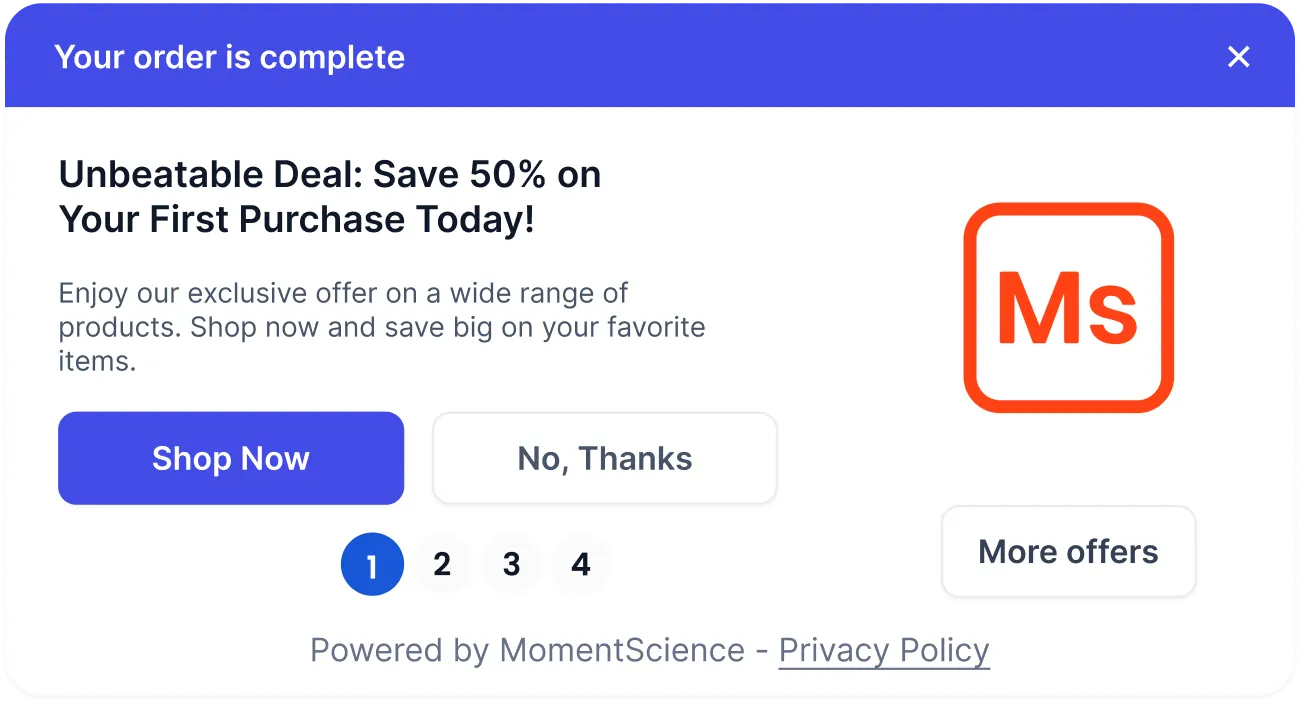
Single Offer Unit (SOU)
A Single Offer Unit displays one offer at a time, allowing users to focus their attention on a specific opportunity.
- Presents a single offer with complete details
- Includes navigation controls to browse through additional offers sequentially
- Maximizes user focus on individual offers
Multi-Offer Unit (MOU)
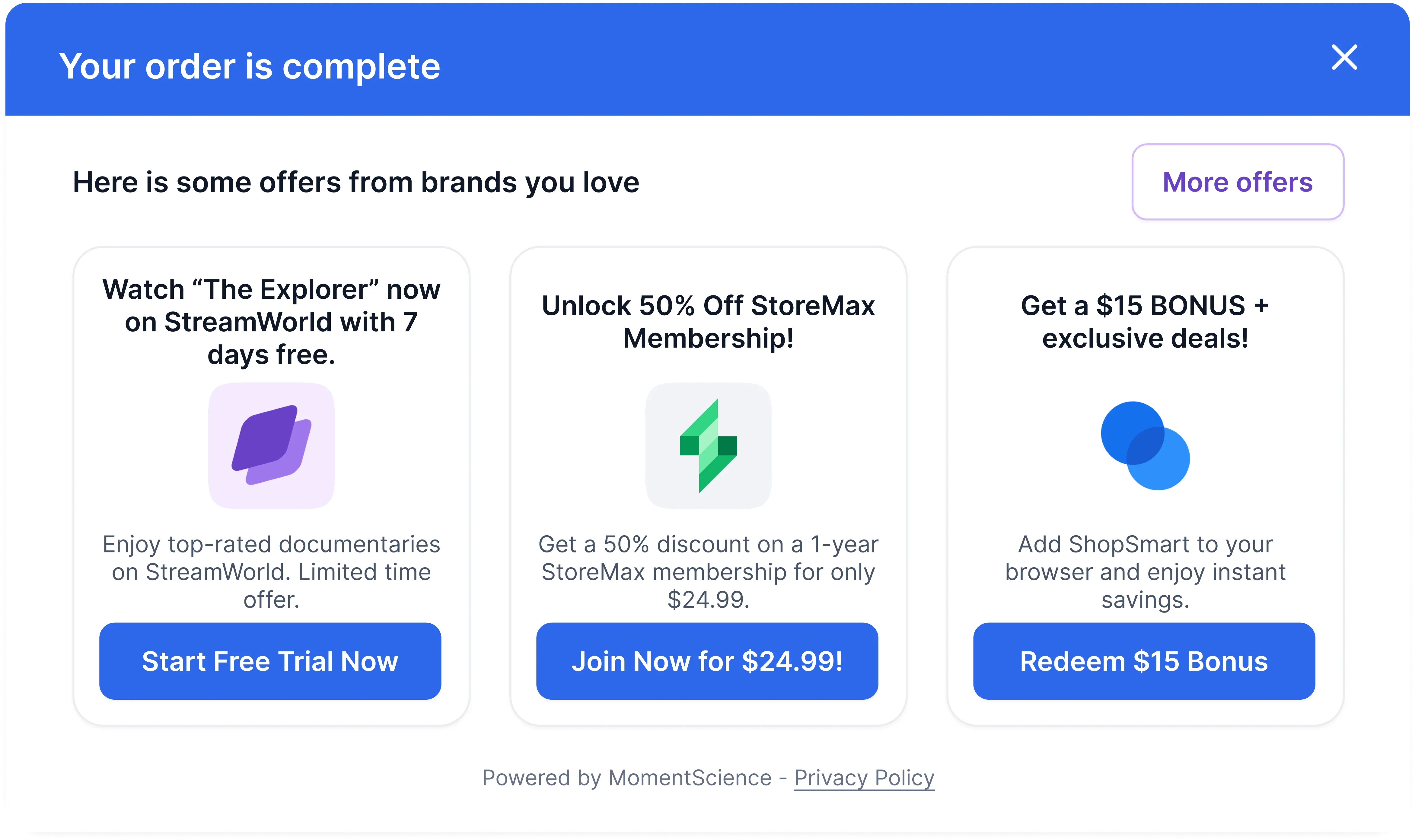
A Multi-Offer Unit shows multiple offers simultaneously, enabling users to compare options at a glance.
- Displays several offers side-by-side in a grid or carousel format
- Allows quick comparison between different opportunities
- Efficient use of screen real estate for multiple offers
These are just examples of display units. You are not limited to implementing them in a specific way. Feel free to design the display format that works best for your use case.
Sample API Response
{
  "data": {
    "offers": [
      {
        "id": 4008,
        "title": "You Unlocked MomentScience For 90 Days - Free!",
        "description": "MomentScience lets you capture revenue across your user's moments. Delight your users with relevant Offers at the right time. Get 3 months free!",
        "click_url": "https://track.momentscience.com/sdk/offer-click?o_id=4008&c_id=1284&p_id=1501&sess_id=03a7c834ffce7ff88ff45f980577ea42a03ec904&fp=string",
        "image": "https://adpx.b-cdn.net/campaigns/1284/598d561b6afb86b76d3137545572a3a9.png",
        "terms_and_conditions": "<ul>\n <li>Must be 18 or older.</li>\n <li>Cancel anytime, subject to terms.</li>\n <li>Terms apply.</li>\n</ul>",
        "pixel": "https://track.momentscience.com/sdk/v2/impression/p.png?o_id=4008&c_id=1284&p_id=1501&sess_id=03a7c834ffce7ff88ff45f980577ea42a03ec904&fp=string&cbuster=%7BCBUSTER%7D",
        "cta_yes": "Try out MomentScience!",
        "cta_no": "No, Thanks",
        "beacons": {
          "close": "https://track.momentscience.com/event/record/close?oid=4008&cid=1284&pid=1501&sess_id=03a7c834ffce7ff88ff45f980577ea42a03ec904&fp=string",
          "no_thanks_click": "https://track.momentscience.com/event/record/no_thanks_click?oid=4008&cid=1284&pid=1501&sess_id=03a7c834ffce7ff88ff45f980577ea42a03ec904&fp=string"
        },
        "creatives": [
          {
            "id": 939,
            "url": "https://adpx.b-cdn.net/campaigns/1284/598d561b6afb86b76d3137545572a3a9.png",
            "height": 1200,
            "width": 1200,
            "type": "png",
            "is_primary": true,
            "aspect_ratio": 1
          }
        ],
        "short_description": "Capture revenue across your user's moments. Get 3 months free!",
        "short_headline": "3 Free Months Of MomentScience!",
        "advertiser_name": "MomentScience"
      }
    ],
    "settings": {
      "offerwall_url": "https://get.perkswall.com/offerwall?accountId=fbe15a0c6f803ef4&offer_count=3&auto_show=1&show_logo=1&show_header=1&show_shadow=0&show_image=1&font_family=Open+Sans&session_id=1d979e855122b01d5eac8622e3a7937609abefdc",
      "offerwall_cta": "More Offers"
    },
    "count": 1,
    "privacy_url": "https://www.momentscience.com/end-user-privacy-policy"
  }
}
Core Offer Components
This section outlines key API parameters for constructing a Multi Offer Unit (MOU) and Single Offer Unit (SOU).
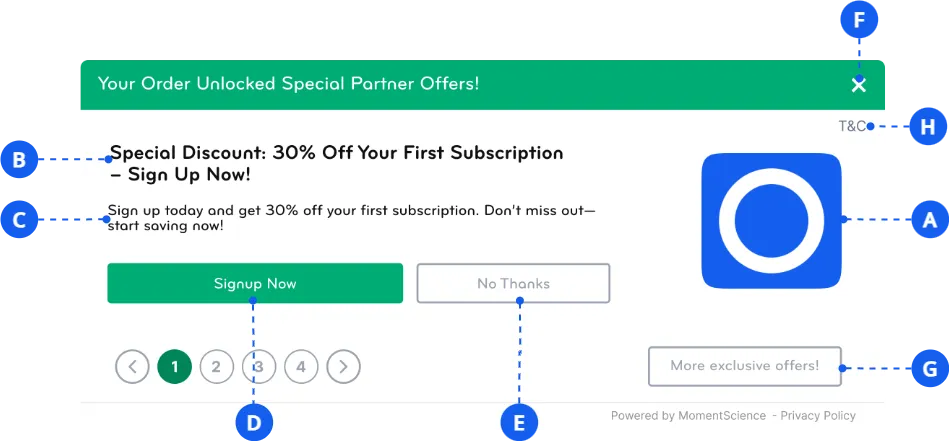
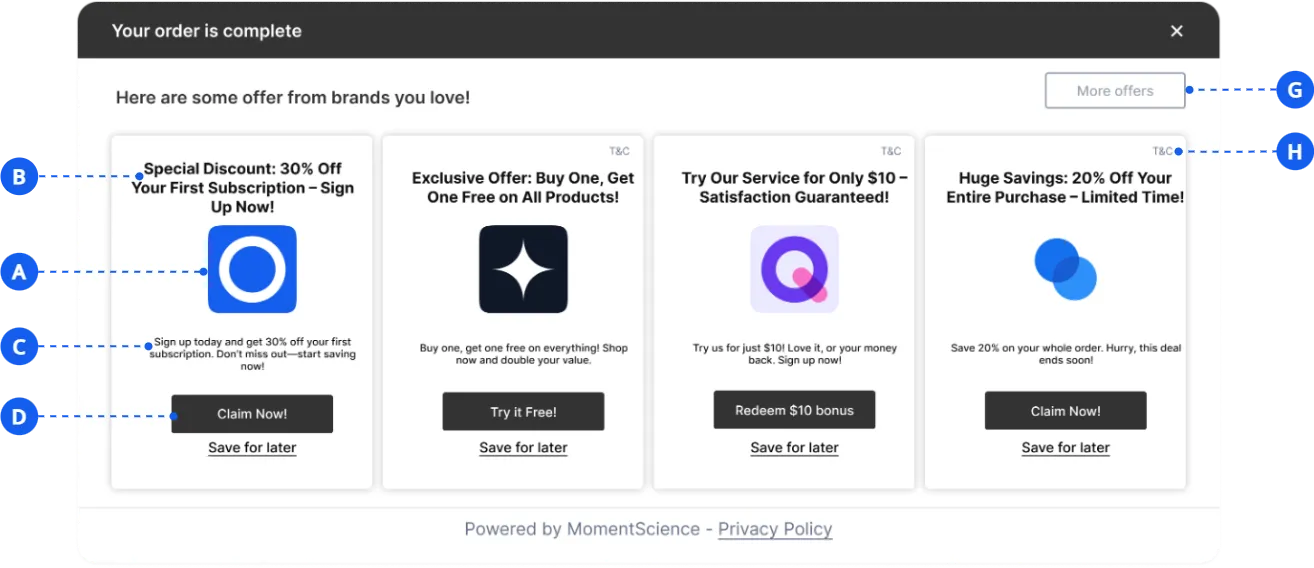
A. offers[].image
- Use for the URL of the offer's main creative.
B. offers[].title
- Use for the offer’s title or headline.
- Note: Useoffers[].short_headline for smaller formats if space is limited.
C. offers[].description
- Use for the offer’s description.
- Note: Use offers[].short_description for smaller formats if space is limited.
D. offers[].click_url
- Use for the URL that the positive CTA should route the user to.
- Set the button's text using offers[].cta_yes.
E. offers[].beacons.no_thanks_click
- Use for firing a GET request when the negative CTA is clicked.
- This is typically paired with offers[].cta_no, which contains the button label.
F. offers[].beacons.close
- This parameter provides a URL that is triggered via a GETrequest when the close button is clicked.
- It is primarily intended for Single Offer Units (SOU) to track and report user interactions, specifically indicating which offer the offer unit was closed on.
G. settings.offerwall_url
- This parameter specifies the Perkswall URL to which users are redirected after clicking on the Perkswall button.
- The button text can be retrieved from settings.offerwall_cta.
H. offers[].terms_and_conditions
- This parameter contains the offer's terms and conditions in HTML format, typically as an unordered list (<ul>). Render it as HTML to maintain formatting.
- Some offers may not include this field. If empty, assume no specific terms apply.
Offer Display Tracking Pixel
The Offer Display Tracking Pixel is critical in tracking when an offer is shown to the user, providing essential data for performance monitoring and analytics. It is triggered every time the associated creative is rendered on the user’s screen.
- Parameter Location: data.offers[].pixel
- Type: URL
Usage Guidelines
- The pixel URL should be fired as soon as the creative is visible to the user, representing that the offer was shown.
- Ensure the pixel fires only once per impression to avoid duplicate data.
- Send an HTTP GET request to the URL in data.offers[].pixel.
This pixel helps ensure accurate measurement of offer impressions, which is vital for understanding user engagement, optimizing campaigns, and analyzing the effectiveness of the displayed offers.
Creative Selection Guide
The creatives array provides multiple image options for different display contexts:
Selection Criteria
- Use the image where is_primary: true as your default option
- Choose images based on their aspect_ratio value:
- Square format (aspect_ratio = 1): Ideal for tiles and balanced layouts
- Portrait format (aspect_ratio < 1): Better for mobile and vertical spaces
- Landscape format (aspect_ratio > 1): Suitable for banners and horizontal layouts
Image Optimization
Optimize creative display by appending transformation parameters to image URLs:
# Resize to specific width
https://image-url.png?width=300

# Resize to specific height
https://image-url.png?height=200

# Adjust aspect ratio
https://image-url.png?aspect_ratio=16:9
If you're running into any issues while going through the integration process, feel free to contact us at help@momentscience.com